

Grubhub is Now at Stevenson
At Stevenson, we’re always looking for ways to offer new and convenient dining options to help quench that thirst and satisfy that craving. Starting October 1, use your Grubhub App for faster on-campus pickup, checking your flex dollars, and more!
Plus, receive $3 off your first meal on October 1 by using the code “noms”.
Grubhub is available to everyone on campus, including faculty and staff. Learn more below and sign up today!
Visit Stevenson’s official Dining Services website to learn about other convenient dining options, meal plans, locations, hours of operation, and more.
How it Works
- Conveniently order meals ahead of time, allowing you to skip the line and get food when you’re ready. Use your flex dollars or Meal Exchange to order food from on-campus locations – mobile ordering is available from The Natural, Garrison Coffee House, and North Cafe.
- Check your flex dollar balance on the app.
- Pay your way – Since Grubhub works with or without a meal plan, you can pay for meals using your campus card (debit and credit cards work too).
- Score student-only deals with exclusive promo codes, giveaways, and other rewards.
- Free Grubhub+Student— Get $0 delivery fees on eligible off-campus orders with your campus card until you graduate.
How to Sign Up
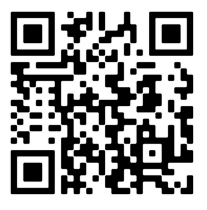
- Download the Grubhub app by visiting the Grubhub website or scanning the QR code.
- After downloading, you will be prompted to connect to Stevenson University.
- Choose your graduation year, or indicate that you’re a faculty or staff member.
- Enter your email.
- Create a password.
- Tap “Add to Card.”
- Enter your Stevenson University username and password and then tap “Login.”
Find more information and step-by-step instructions here.
Get Started with Grubhub